How this counter counts
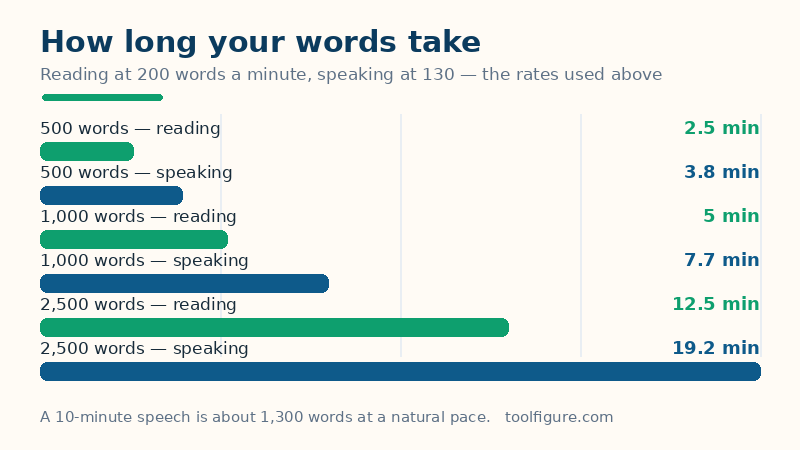
This word counter counts words, characters and sentences live as you type, and estimates reading time at about 200 words a minute and speaking time at about 130. Hyphenated words and numbers each count as one word, the convention most editors use. Everything runs privately in your browser — nothing you paste is uploaded, stored or read by us. Words are separated by spaces, line breaks and tabs. A hyphenated word like "well-known" counts as one word, and numbers count as words — the same convention used by most editors and word processors. Sentences end with a full stop, question mark or exclamation mark. Reading time assumes about 200 words per minute (average adult silent reading) and speaking time about 130 words per minute (a natural presentation pace).
Typical lengths worth knowing
| Thing | Typical length |
|---|---|
| Cover letter | 250–400 words |
| College essay (common prompts) | 500–650 words |
| Blog article | 1,000–2,500 words |
| 10-minute speech | ~1,300 words |
| Novella / short novel | 20,000–50,000 words |
Your text stays yours
Everything is counted by code running in your own browser. Nothing you type or paste here is uploaded, stored or read by us — close the tab and it is gone.
Worked example — the UK UCAS personal statement limit
A UCAS personal statement is limited to 4,000 characters including spaces — so for applicants the Characters column above, not the word count, is the number that decides whether an application can be submitted. The counting rules are easy to test on one sentence: "The quick brown fox jumps over the lazy dog." counts as 9 words, 44 characters, 36 characters without spaces and 1 sentence. Paste a draft statement and the verdict is instant: at 4,000 characters you are at the line, and a draft at 4,300 needs roughly 300 characters — about two average sentences — trimmed, which the most-used-words line can help you find (repeated filler phrases are usually the cheapest cuts).
Worked example — a US college essay and a speech
The Common App essay limit of 650 words is a word count, and the same 650 words take about 3.3 minutes to read silently at the 200-words-per-minute rate this page uses — the length of a careful read by an admissions officer, which is a useful way to think about pacing. Double it to a 1,300-word graduation or wedding speech and the speaking time, at a natural 130 words a minute, is 10 minutes: most speakers who "only wrote two pages" are surprised by that figure, which is exactly why the speaking-time column exists.
How to read the numbers
Characters (no spaces) is the count that matters for social posts, meta descriptions and many form fields. Sentences and paragraphs describe structure: divide words by sentences for average sentence length (around 15–20 words reads easily; a draft averaging 30+ will feel heavy). Under the table, the most-used words line is a simple keyword-density check — a word appearing 30 times in a 1,000-word piece has a density of 3%, and anything much above that in an article usually reads as repetitive rather than emphatic.
Limitations
Sentence counting is punctuation-based: text is split on full stops, question marks and exclamation marks, so abbreviations such as "e.g." or "Dr." inflate the sentence count and shorten the apparent average sentence. Reading and speaking times are planning averages — technical material reads slower than fiction, and nervous speakers run faster than 130 words a minute. And because words are found by splitting on whitespace, text in languages written without spaces between words (Chinese, Japanese, Thai) needs a character count instead: each character is roughly a word-equivalent for length purposes.
Common mistakes
- Watching words when the limit is characters. Application forms, adverts and social platforms often limit characters. Check which limit applies before you start cutting the wrong thing.
- Assuming double spaces change the word count. They do not — words are split on any run of whitespace — but they do inflate the character count, which matters where characters are the limit.
- Forgetting that numbers and hyphenated words count. "2026" is a word here, and "well-known" is one word, matching the convention of most editors and exam boards.
- Pasting from a PDF without checking. PDF text often carries line breaks mid-sentence and ligature quirks; the count stays right, but the paragraph count can look odd until the text is tidied.
Related tools: Age Calculator — Exact age in years, months, days — and days until your next birthday; GPA Calculator — Semester and cumulative GPA on the 4.0 scale, with dynamic course rows; Percentage Calculator — What is X% of Y, X is what % of Y, and % change — with steps.
Frequently asked questions
Does the word counter save my text?
No. The counting happens entirely in your browser; ToolFigure's servers never receive your text.
Why does my word count differ from Microsoft Word?
Small differences come from edge cases: hyphenated words, numbers, and text inside tables or text boxes. For normal paragraphs the counts match.
What reading speed does the reading-time estimate use?
200 words per minute, the middle of the typical adult range (180–250). Fast readers will finish sooner.
Can I count words in a document file?
Copy and paste the text into the box above — pasting works from Word, Google Docs, PDFs and web pages.
How is keyword density worked out from the numbers here?
Take the count shown next to a word in the most-used list and divide it by the total word count, then multiply by 100. A word used 25 times in a 1,000-word article has a density of 2.5%. Very common words (the, and, of) will always top the list in normal prose — judge density on your subject words, not the grammar words.
Does the counter include headings, captions and bullet lists?
Yes — everything pasted into the box is counted on equal terms, because from a reader's point of view it is all text. If a limit applies only to the main body (some essay rules exclude references and headings), count those parts separately and subtract.
The worked examples on this page were checked against this calculator on 18 October 2026.