Not a row of buttons that forgets the rules — a real expression solver
A basic calculator works left to right and gets 3 + 4 x 2 wrong (it says 14). A scientific calculator follows the order of operations — powers before multiplication, multiplication before addition, brackets before everything — and says 11, which is correct. This one goes further: you type or tap a whole expression, exactly as you would write it on paper, and it parses the expression properly before solving it. That means brackets can nest, functions like sin( and sqrt( wrap whole sub-expressions, a minus sign can open an expression, and multiplication you leave unwritten — 2pi, 2(3+4) — is understood. It also means mistakes get honest answers: divide by zero, take the root of a negative number or the log of zero and it tells you why there is no answer, instead of printing NaN like a slot machine. Everything runs in your browser, privately, like every tool on this site — pair it with the fraction calculator when a decimal answer needs to become an exact fraction again.
The rules it follows (the "formula" of a scientific calculator)
Order of operations: brackets first, then functions, then powers (^), then x and ÷, then + and −sin / cos / tan take an angle — in degrees or radians, your choice abovelog is base 10: log(1000) = 3 because 103 = 1000 · ln is base e: ln(e) = 1n! (factorial) = n x (n−1) x ... x 2 x 1 · % divides by 100: 50% = 0.5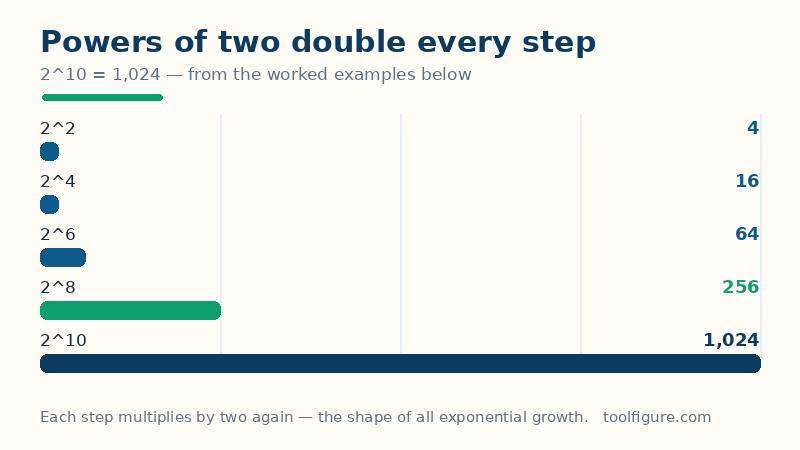
The pieces, in plain language. Brackets force a part of the expression to be worked out first: (3 + 4) x 2 = 14, where 3 + 4 x 2 = 11. Powers use the ^ symbol: 2^10 means 2 multiplied by itself 10 times. Trig functions (sin, cos, tan and their inverses asin, acos, atan) measure angles, and the same angle has two common units — 180 degrees is the same angle as pi radians — so the mode switch above genuinely changes answers: sin(30) is 0.5 in degrees but about −0.988 in radians, and neither is a bug. Logarithms answer "what power?": log asks it about 10, ln asks it about the constant e (about 2.71828). Factorial, written with !, multiplies a whole number by every whole number below it, and grows so fast that 170! is the largest this — or any standard — calculator will show.
Worked examples, each one checked
Every result in this table was produced by this calculator and verified independently before this page was published — the same standard as the worked examples on our percentage calculator:
| Expression (degrees mode) | Result | Why |
|---|---|---|
| 3 + 4 x 2 | 11 | Multiplication before addition |
| (3 + 4) x 2 | 14 | Brackets first |
| 2^10 | 1,024 | 2 doubled ten times |
| sqrt(144) | 12 | 12 x 12 = 144 |
| sin(30) | 0.5 | The classic 30-degree value |
| cos(60) | 0.5 | The classic 60-degree value |
| tan(45) | 1 | Opposite equals adjacent at 45 degrees |
| log(1000) | 3 | 10^3 = 1,000 |
| ln(e) | 1 | e^1 = e |
| 5! | 120 | 5 x 4 x 3 x 2 x 1 |
Try the first two rows yourself to feel the bracket rule, then the trig rows after flipping the mode switch to radians — sin(30) changing from 0.5 to about −0.988 is the single most common "my calculator is broken" moment in school maths, and it is almost always just the angle mode. The bars below draw one row's family: powers of two, doubling at every step until 2^10 reaches 1,024 — the same compounding shape as the growth in our compound interest calculator, just with a 100% rate.
Degrees or radians — which should you use?
Use degrees for everyday geometry, navigation, construction and most school work: right angles are 90, a half-turn is 180, the numbers stay friendly. Use radians for calculus, physics and anything involving rotation speeds or waves, where the angle is measured as distance around a unit circle — a full turn is 2pi (about 6.283), a right angle is pi/2 (about 1.571). The inverse functions follow the same mode: asin(0.5) returns 30 in degrees mode and about 0.524 in radians mode — the same angle, two rulers. If a trig answer looks wildly wrong, check the mode before you check the maths; this page prints the active mode under every result for exactly that reason.
What this calculator cannot do
It solves one numeric expression at a time — it does not plot graphs, solve equations for x, handle complex (imaginary) numbers, or work symbolically, so sqrt(−4) is honestly refused rather than answered with 2i. Results are shown rounded to 12 significant digits, which hides the harmless dust of binary arithmetic (sin(30) is stored as 0.49999999999999994 internally and displayed as the 0.5 it truly is) — but for engineering work where the 13th digit matters, verify critical figures in dedicated software. Very large results overflow honestly: factorials stop at 170! and huge powers report that they are too large, instead of printing Infinity. And a practical note: % here is a percent sign, not modulo — 50% means 0.5, and 200 + 10% means 200.1 by strict parsing, so for percentage-of calculations use the dedicated percentage calculator, which is built for that job.
Frequently asked questions
What is the order of operations this calculator uses?
Brackets first, then functions like sin and sqrt, then powers, then multiplication and division (left to right), then addition and subtraction (left to right). That is why 3 + 4 x 2 gives 11, not 14 — and why (3 + 4) x 2 gives 14: the brackets move the addition to the front of the queue.
Why does sin(30) give 0.5 on one calculator and −0.988 on another?
Angle mode. In degrees mode, sin(30 degrees) = 0.5 exactly. In radians mode the same keystrokes ask for sin(30 radians), which is about −0.988. Neither calculator is broken — they are measuring the angle with different rulers. Use the mode switch above the keypad and check the mode printed under your result.
What is the difference between log and ln?
Both are logarithms — they answer 'what power gives this number?' — but with different bases. log is base 10, so log(1000) = 3 because 10^3 = 1000. ln is the natural log, base e (about 2.71828), so ln(e) = 1. Logs of zero or negative numbers have no real answer, and this calculator says so instead of guessing.
How big a factorial can it calculate?
Up to 170!. Factorials explode: 5! = 120, 10! = 3,628,800, and 170! is about 7.257 x 10^306 — close to the largest number standard calculator arithmetic can hold. Beyond that the calculator reports the overflow honestly rather than printing Infinity. Factorials also need whole numbers: 4.5! is refused, because the everyday factorial is only defined for whole numbers.
Does the calculator remember or send my expressions?
No. The expression is parsed and solved entirely in your browser by the code on this page — nothing is sent to a server or stored, the same privacy rule as every ToolFigure tool. You can even disconnect from the internet after the page loads and it keeps working.