A countdown is a difference with a direction
Most date questions look backwards — how many days have passed between two dates. A countdown asks the same arithmetic forwards: starting from a date you choose, how long is left until the date that matters? This calculator takes a start date and a target date and returns the gap every way people actually plan in it: calendar days, weeks and days, calendar months and days, business days (Monday to Friday), weekend days and hours. Set the start date to today and it is a live countdown to an exam, a wedding, a launch or a holiday. Pick a target in the past and it answers honestly instead — how many days ago it was. The optional event name changes nothing in the maths; it labels the result line so a copied result still says what it was counting to.
The formula, with every term defined
Days remaining = target date − start date (in whole calendar days)Weeks + days = days remaining ÷ 7, quotient and remainderBusiness days = the Monday-to-Friday days inside the span (the start date itself is not counted; the target date is, when it falls on a weekday)Hours = days remaining × 24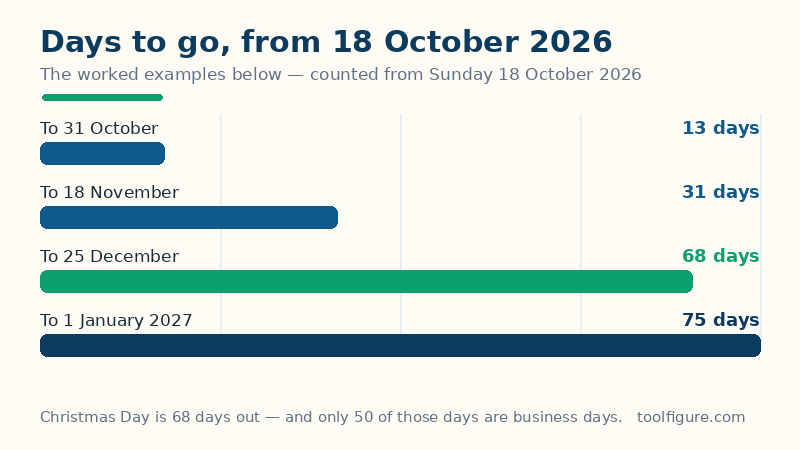
The start date is the day you count from — today, if you leave it as your current date. The target date is the day you count to. The subtraction is done in whole days on a real calendar, so month lengths and 29 February are handled exactly, never approximated as 30-day months. The business-day rule matches the convention used across this site's date tools: counting runs over the days after the start date, up to and including the target date — the same rule behind a form submitted on Monday with five business days to process being counted from Tuesday. The months figure is a true calendar count, not days divided by 30: whole calendar months are stepped first (clamping at month ends, so 31 January plus one month lands on the last day of February), and the leftover days are whatever remains.
Worked example: 18 October 2026 to Christmas Day, 25 December 2026
The defaults above freeze a real countdown so every figure can be checked by hand. From Sunday 18 October 2026 to Friday 25 December 2026: October contributes 13 days after the 18th (to 31 October), November contributes 30, and December contributes 25 — 13 + 30 + 25 = 68 days. That is 9 weeks and 5 days (9 × 7 = 63, remainder 5), 2 calendar months and 7 days (18 October to 18 November is one month, to 18 December is two, then 7 more days reach the 25th), and 1,632 hours (68 × 24). Inside those 68 days sit 50 business days and 18 weekend days — the split the bar above draws, and the reason a project with "68 days left" really has 50 working days, before public holidays take any more. The target weekday, Friday, is shown in the table because a deadline's weekday decides whether it is a working day at all.
More countdowns from the same start date
| Target | Days | Weeks + days | Business days |
|---|---|---|---|
| 31 October 2026 (Saturday) | 13 | 1 week, 6 days | 10 |
| 18 November 2026 (Wednesday) | 31 | 4 weeks, 3 days | 23 |
| 25 December 2026 (Friday) | 68 | 9 weeks, 5 days | 50 |
| 1 January 2027 (Friday) | 75 | 10 weeks, 5 days | 55 |
Two rows reward a second look. The 31-day row lands exactly one calendar month after the start — 18 October to 18 November — which is why the months column and the days column agree there. And the last row shows the gap between a festive date and a working reality: New Year is 75 calendar days away but only 55 of them are business days, so a plan that needs 60 working days before 1 January cannot be rescued by optimism — it is five days short, and this table is where that becomes visible in October rather than December.
When the target has already passed
Choose a target before the start date and the calculator reports it as days ago instead of failing or showing a negative number: from 18 October 2026, a target of 1 October 2026 reads 17 days ago, with 11 business days and 6 weekend days in that span. A target equal to the start date reads Today — 0 days. That symmetry is deliberate: the same page serves "days until my exam" in June and "how long ago was my exam" in July, and the business-day split stays meaningful in both directions because it is counted on the span between the two dates, whichever is earlier.
How to read your result, and the limits
The big figure is calendar days — the number most countdowns mean. Plan work in the business-days figure, plan life in the calendar figure, and use hours only where an hourly deadline is real (1,632 hours sounds dramatic; it is the same 68 days). Limits, stated plainly: business days here are Monday to Friday with no public holidays deducted, because holidays differ by country and region — a span crossing Christmas contains fewer working days than the figure shown, and the business days calculator lets you deduct weekday holidays explicitly. The count is in whole days: a target at a specific hour (a flight, a submission portal closing at noon) needs the clock checked separately, and the hours calculator handles times within a day. For the plain difference between two past dates, the days-between-dates calculator is the sibling tool; to find the date a number of days from now, use the date calculator.
Frequently asked questions
How many days are there until Christmas 2026?
Counted from Sunday 18 October 2026, Christmas Day (Friday 25 December 2026) is 68 days away — 9 weeks and 5 days, containing 50 business days. Set the start date above to today for the figure from wherever you are reading this.
Does the countdown include today or the target day?
It counts the difference: the start day itself is not counted, and the target day is the day the count reaches. From 18 October to 25 December the difference is 68 days. That matches how deadlines work — “in 68 days” lands on the target date itself.
Why are business days so much lower than calendar days?
Because weekends are roughly two sevenths of any long span. In the worked example, 68 calendar days contain 18 weekend days, leaving 50 business days — and public holidays would reduce the working total further, which is why this page never mixes the two figures.
What happens if I pick a date in the past?
The calculator reports it as days ago, with the same weeks, business-day and weekend split counted on the span between the dates. Picking the same date twice reports Today — 0 days.
How do I count down to a birthday or anniversary that repeats every year?
Enter this year's occurrence as the target. If it has already passed this year, enter next year's date instead — the calculator will show the full countdown to the next one. The age calculator linked below handles birthdays themselves, including the exact age reached on the day.