Clock-in to clock-out, turned into numbers a timesheet accepts
A shift is easy to live and surprisingly fiddly to write down. You started at 09:00 and finished at 17:30 — but the timesheet wants decimal hours, payroll wants the unpaid lunch break removed first, and a night shift that ends at 06:00 the next morning breaks the obvious subtraction entirely. This calculator takes a start time, an end time and a break in minutes, and returns the counted time three ways: as hours and minutes (8h 00m), as decimal hours (8.00, the format timesheets and payroll systems actually use), and — if you give an hourly rate — as gross pay for the shift. If the end time is earlier than the start, it assumes the shift crosses midnight and says so, instead of returning a negative number or an error.
The formula, with every term defined
Clocked span = end time − start time (add 24 hours when the end is earlier — the shift crosses midnight; identical times count as a full 24 hours)Counted minutes = clocked span in minutes − unpaid break in minutesDecimal hours = counted minutes ÷ 60Gross pay = decimal hours × hourly rate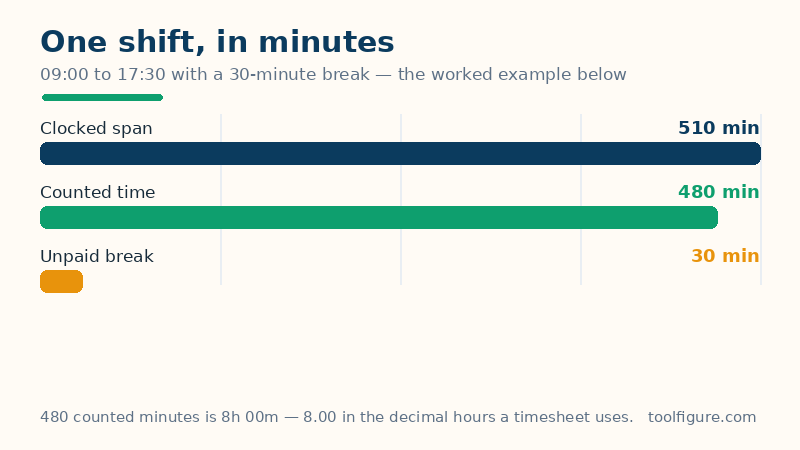
The clocked span is everything between the two times, break included. The break is unpaid time inside that span — a lunch hour, typically — and it is subtracted in minutes because breaks rarely align to neat fractions of an hour. Decimal hours are where most hand calculations go wrong, so be precise about them: the decimal is minutes divided by 60, which means 45 minutes is 0.75 of an hour, not 0.45. The final line is deliberately labelled gross pay: it is the shift's pay before tax and every other deduction, at a single straight rate — overtime rules are real, vary by employer and jurisdiction, and are honestly outside what two time fields can know, as the limitations section states.
Worked example: 09:00 to 17:30, a 30-minute break, $20 an hour
The defaults above describe the standard office day. The clocked span from 09:00 to 17:30 is 8 hours 30 minutes — 510 minutes. Remove the 30-minute unpaid break and the counted time is 480 minutes, which is 8h 00m. In decimal hours that is 480 ÷ 60 = 8.00 exactly, and at $20 an hour the gross pay is 8.00 × $20 = $160.00. The bar above draws exactly this: the green counted stretch and the amber break together rebuild the full 510-minute span. Every figure on this page can be re-derived that way from the two times and the break — if a timesheet ever disagrees with you, this three-step path (span, minus break, divide by 60) is the audit trail to walk it through.
More verified shifts — overnight, early-start and long
| Start → End | Break | Counted | Decimal |
|---|---|---|---|
| 22:00 → 06:00 (overnight) | 0 min | 8h 00m | 8.00 |
| 07:45 → 16:15 | 45 min | 7h 45m | 7.75 |
| 12:00 → 12:30 | 0 min | 0h 30m | 0.50 |
| 08:00 → 20:00 | 60 min | 11h 00m | 11.00 |
The overnight row is the one worth studying. 22:00 to 06:00 by the clock-face subtraction is negative eight hours; with the midnight rule — add 24 hours when the end is earlier — the span is (24:00 − 22:00) + 06:00 = 2 + 6 = 8 hours, the shift every night worker recognises. The 07:45 row carries the page's most useful warning: 7h 45m is 7.75 decimal hours, and at an $18.50 rate it pays 7.75 × $18.50 = $143.38 — while the common slip of typing 7.45 into a timesheet pays out on 7.45 hours and quietly loses 18 minutes of wages. And the half-hour row shows why the decimal column exists at all: 0h 30m and 0.50 are the same length of time wearing two notations, and payroll only accepts one of them.
Totalling a week, and the decimal trap in one table
For a full week, calculate each day and add the decimal hours — decimals are the format designed for adding. Five days of the worked example give 8.00 × 5 = 40.00 decimal hours: 40h 00m, 2,400 counted minutes, and $800.00 of gross pay at $20 an hour. Keep this conversion table beside any hand total, because it is the whole trap in four lines: 15 minutes = 0.25, 30 minutes = 0.50, 45 minutes = 0.75, and 10 minutes ≈ 0.17. The pattern is minutes over 60, never the minute count with a dot in front of it. If your employer rounds clock times — to the nearest 6, 10 or 15 minutes is common — apply their rounding to the start and end times before entering them here, because rounding rules are set by payroll policy, not by arithmetic, and this calculator reports the exact times you give it.
How to read your result, and the limits
The big figure is counted time in hours and minutes; the table separates the clocked span, the break and the counted time so each can be checked, and the bar shows the same split as a picture — if the amber break slice looks large, it is, relative to the shift. Limits, stated plainly: a single calculation covers at most 24 hours, because start and end are clock times with no dates attached — for multi-day spans between dates, the days-between-dates calculator and the date calculator handle the calendar side. No overtime multiplier, weekend rate or holiday rate is applied to the pay figure, and no tax is deducted; the salary-to-hourly calculator covers the wider pay picture. Times are wall-clock times: on the two nights a year when clocks spring forward or fall back, a shift crossing the change genuinely lasts one hour more or less than the clock-face span, and no time-only calculator can see that — check those two shifts against your employer's policy.
Frequently asked questions
How do I calculate hours between two times?
Subtract the start from the end, remove any unpaid break, and divide the remaining minutes by 60 if you need decimal hours. From 09:00 to 17:30 is 510 minutes; minus a 30-minute break is 480 minutes; 480 ÷ 60 = 8.00 decimal hours. If the end time is earlier than the start, add 24 hours first — the shift crosses midnight.
Why is 7 hours 45 minutes written as 7.75 and not 7.45?
Because decimal hours are minutes divided by 60, and 45 ÷ 60 = 0.75. Writing 7.45 is the most common timesheet error there is: it under-records the shift by 18 minutes. The reliable conversions are 15 minutes = 0.25, 30 = 0.50, 45 = 0.75 — always the minutes over 60.
How are overnight shifts handled?
When the end time is earlier than the start time, the calculator counts the end time on the following day: 22:00 to 06:00 is an 8-hour shift, not a negative number. If the start and end times are exactly equal, it counts a full 24 hours and tells you it did — two identical times cannot describe a shorter shift without a date attached.
What if my break is longer than the shift, or the numbers look wrong?
The calculator refuses that case with an explanation rather than showing negative time: a break must be shorter than the span between the two times. If a result surprises you, check the three table rows in order — clocked span, break, counted time — the mistake is almost always a mistyped time, and the rows show which stage it entered at.
How do I total a whole week of shifts?
Run each day separately and add the decimal hours — that is what the decimal format is for. Five days of 09:00 to 17:30 with a 30-minute break is 8.00 × 5 = 40.00 hours. Add days in hours-and-minutes form only if you enjoy carrying sixties; in decimals, a week is one addition.