One question this page answers that the general percentage tool does not
Our percentage calculator answers three different questions, and percentage change is only one of them. This page exists because change is where almost every real-world mistake happens: a pay rise quoted against the wrong base, a discount reversed the wrong way, a fall of 50% followed by a rise of 50% that does not get you back to where you started. So this calculator is built entirely around change, in all three directions. Mode 1 measures a change you have already seen (old value → new value). Mode 2 applies a change you are planning (a starting value plus a percent). Mode 3 reverses a change — given the final value and the percent that produced it, it recovers the original, which is the calculation behind "what was the price before VAT?" and "what did it cost before the rise?". Every mode shows its working with your numbers, and every figure on this page was produced by the calculator above and checked independently before publication.
The formulas — three directions, one idea
Percent change = ((new − old) ÷ |old|) × 100Applying a change: new = old × (1 + p ÷ 100) — for a decrease, p is negativeReversing a change: old = new ÷ (1 + p ÷ 100)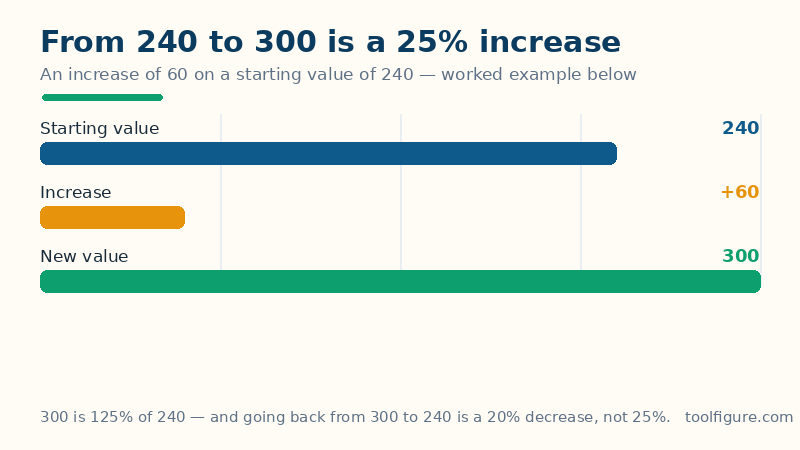
Every symbol, pinned down. Old is where you started and new is where you ended; p is the percent change, written negative for a decrease (a fall of 8% is p = −8). The first formula is the whole subject in one line: take the difference, and divide it by the starting value — never the ending one — because a change only means something relative to what it changed from. The bars around |old| mean the size of the old value ignoring its sign; they matter only when values go negative (a loss shrinking from −50 to −25 is a 50% improvement, and dividing by the size, 50, is what gives that sensible answer). The second and third formulas are the same fact read forwards and backwards: a change of p% multiplies the starting value by (1 + p ÷ 100), so undoing the change means dividing by that same multiplier — not subtracting p% of the final value, which is a different and smaller amount.
Worked example: from 240 to 300
A quantity rises from 240 to 300 — the defaults in the calculator above, so you can check every line against it. The difference is 300 − 240 = 60. Divide by the starting value: 60 ÷ 240 = 0.25, times 100 gives a 25% increase. Two companion facts fall out of the same numbers and both appear in the results table. First, the new value as a percent of the old is 300 ÷ 240 × 100 = 125% — "125% of the original" and "a 25% increase" are the same event described twice, and confusing them is how a price that rose to 125% gets reported as rising by 125%. Second, the trip back is not −25%: from 300 down to 240 is a change of −60 divided by the new starting point, 300, which is −20%. Increases and decreases are not mirror images, because the base moves. The bars below draw the example: the start, the increase, and the total.
More verified changes — read the base, not just the answer
| From | To | Change | Percent change |
|---|---|---|---|
| 50 | 65 | +15 | +30% |
| 200 | 170 | −30 | −15% |
| 90 | 108 | +18 | +20% |
| 40 | 10 | −30 | −75% |
| 75 | 75 | 0 | 0% |
Look at rows two and four: both move by exactly 30 units, yet one is a 15% change and the other is 75%. The unit change is identical; the starting point is not, and percent change is a statement about the relationship between the two, not about the gap alone. That is also why a 75% fall (row four) needs a 300% rise to undo it — from 10 back to 40 is +30 on a base of 10 — while the gentle-looking 15% fall in row two needs only a 17.65% rise to reverse (30 ÷ 170). Whenever a percent change surprises you, check which number it was divided by; nine times out of ten, that is the whole story. The same discipline powers the year-on-year comparisons in our inflation calculator, where each year's change is measured against that year's starting price level.
Applying and reversing: the two directions people get wrong
Applying. A starting value of 250 with a 12% increase: 12% of 250 is 30, so the new value is 280 — or in one step, 250 × 1.12 = 280. The same start with an 8% decrease (enter −8) loses 20 and lands on 230: 250 × 0.92 = 230. The multiplier form is the one worth learning, because it chains honestly: two successive 10% rises are × 1.1 then × 1.1 again — 250 → 275 → 302.50, a 21% total rise, not 20%. Reversing. You are told a value of 280 is what remains after a 12% increase. The original is 280 ÷ 1.12 = 250. Watch the trap the calculator's third mode is built to avoid: subtracting 12% of 280 gives 280 − 33.60 = 246.40, which is wrong, because the 12% was charged on the original 250, not on the final 280. The same pattern recovers a pre-tax price (divide a tax-inclusive total by 1 plus the tax rate as a multiplier) and a pre-discount price — and our discount calculator shows the forward version of that shop-floor arithmetic.
Percent change is not percentage difference — and not percentage points
Three near-identical phrases mean three different calculations, and mixing them up is the most common reporting error in the subject. Percent change (this page) needs a direction — an old value and a new one — and divides by the old. Percentage difference is for comparing two values where neither came first — two quotes for the same job, say — and divides by their average instead: for 240 and 300 the percentage difference is 60 ÷ 270 ≈ 22.22%, against the 25% change from 240 to 300. Percentage points are the plain subtraction of two percentages: an interest rate moving from 4% to 5% rose by 1 percentage point, which is simultaneously a 25% increase in the rate itself. If a headline says a rate "rose by 1%", you cannot know which of those it means until you check — this page's first mode is the tool for checking.
Frequently asked questions
How do I calculate percentage increase?
Subtract the old value from the new value, divide the result by the old value, and multiply by 100. From 240 to 300: (300 − 240) ÷ 240 × 100 = 25%. Mode 1 above does all three steps and shows them with your numbers.
Why is going back a different percentage?
Because the base changes. Rising from 240 to 300 is +60 measured against 240 (+25%), but falling back from 300 to 240 is −60 measured against 300 (−20%). Percent change is always relative to where that particular trip started, so a rise and its reversal never carry the same percentage — a 50% fall needs a 100% rise to undo it.
How do I find the original value before a percent change?
Divide the final value by (1 + p ÷ 100), where p is the percent change (negative for a decrease). A final value of 280 after a 12% increase came from 280 ÷ 1.12 = 250. Never subtract the percentage from the final value — the percentage was calculated on the original, not on the final amount. Mode 3 above does this.
What is the difference between percent change and percentage difference?
Direction. Percent change compares a new value with its own old value and divides by the old value. Percentage difference compares two values where neither is 'first' — two quotes, two measurements — and divides by their average. For 240 and 300: the change from 240 to 300 is +25%, the percentage difference is about 22.22%.
Can percent change be more than 100%, or measured from a negative value?
Yes to both, with care. Anything that more than doubles has increased by more than 100% — from 40 to 100 is +150%. From a negative starting value the calculator divides by the size of the start, so a loss shrinking from −50 to −25 reads as a +50% improvement. The one case with no answer is a starting value of exactly 0, where the change is reported in plain units instead.