The shape of a rectangle, stated as one fact
Every screen, photo, video and picture frame has a shape, and that shape — not its size — is what decides whether an image fills a display or leaves black bars, fits a frame or must be cropped. The shape is the aspect ratio: the width compared with the height, reduced to the smallest whole numbers that keep the same proportion. This calculator simplifies any width and height to that ratio, states it as a decimal, counts the pixels inside it, and — the job it is most often opened for — scales the shape to a new size: give it one new dimension and it returns the other, so a resize keeps the picture's shape instead of stretching faces and circles into ovals. It is the display-and-print cousin of the general ratio calculator, which simplifies, solves proportions and splits totals; this page is kept strictly to the width-and-height job, where the vocabulary of 16 : 9, 4 : 3 and megapixels lives.
The method, with every term defined
Aspect ratio = width : height, both divided by their greatest common divisor (GCD)Decimal ratio = width ÷ height · Total pixels = width × heightMatching height for a new width = new width × height ÷ width · Matching width for a new height = new height × width ÷ height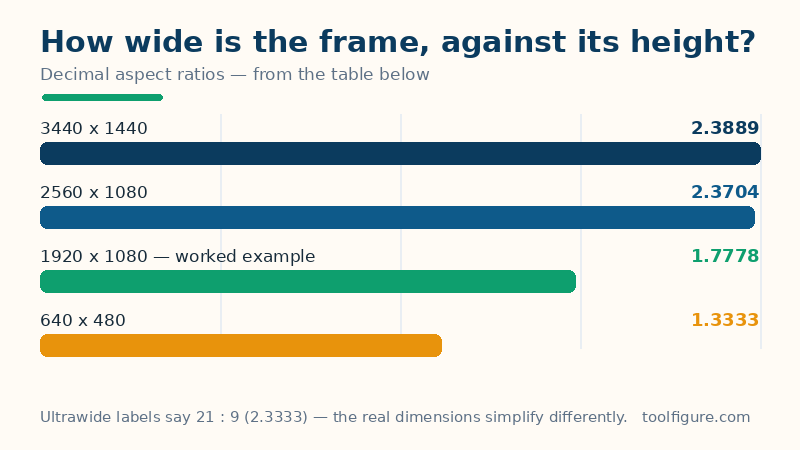
The greatest common divisor is the largest whole number that divides both dimensions exactly — dividing by it shrinks the pair to its simplest statement without changing the proportion at all, which is why 1,920 : 1,080 and 16 : 9 are the same shape. The decimal ratio is the same fact as a single number: how many times as wide as it is tall the frame is, the form video players and CSS use. The pixel count is a size fact, not a shape fact — two frames can share a ratio and differ a hundredfold in pixels — and it is shown because a resize that keeps the ratio can still throw away most of the picture's detail. When the dimensions are not whole numbers (a 2.39 : 1 cinema frame, a print measured in decimals), there is no GCD to divide by, and this page states the ratio honestly in its decimal form, as a number to 1.
Worked example: 1920 × 1080
The defaults above are the standard full-HD frame, 1,920 wide by 1,080 high, scaled to a new width of 1,280. The GCD of 1,920 and 1,080 is 120, and dividing both by 120 gives the simplified ratio 16 : 9. As a decimal the width is 1,920 ÷ 1,080 = 1.7778 times the height. The frame holds 1,920 × 1,080 = 2,073,600 pixels — 2.07 megapixels. Scaled to the new width, the matching height is 1,280 × 1,080 ÷ 1,920 = 720 exactly, so 1,280 × 720 is the same shape smaller — which is why 720p and 1080p footage mix without distortion. Run the scale the other way, to a height of 540, and the matching width is 540 × 1,920 ÷ 1,080 = 960.
Common sizes, checked the same way
| Size (width × height) | Simplified ratio | Decimal | Pixels |
|---|---|---|---|
| 640 × 480 | 4 : 3 | 1.3333 | 307,200 |
| 800 × 600 | 4 : 3 | 1.3333 | 480,000 |
| 1280 × 720 | 16 : 9 | 1.7778 | 921,600 |
| 1920 × 1080 — worked example | 16 : 9 | 1.7778 | 2,073,600 |
| 2560 × 1080 | 64 : 27 | 2.3704 | 2,764,800 |
| 3440 × 1440 | 43 : 18 | 2.3889 | 4,953,600 |
| 3840 × 2160 | 16 : 9 | 1.7778 | 8,294,400 |
Two rows reward a second look. The ultrawide rows do not simplify to the tidy 21 : 9 printed on their boxes: 2,560 × 1,080 is really 64 : 27 and 3,440 × 1,440 is really 43 : 18 — close to 21 : 9 (2.3333) but not equal to it, which is why ultrawide footage can show slivers of black bar on a screen sold under the same label. And the first and last rows carry the page's central lesson in both directions: 640 × 480 and 800 × 600 are the same shape at different sizes, while 1,920 × 1,080 has over four times the pixels of 800 × 600 at a completely different shape — ratio says nothing about size, and size says nothing about ratio.
How to read your result — and its limits
Use the simplified ratio to match content to screens and frames, and the scaled size whenever you resize: change one dimension, take the matching other dimension from this page, and nothing stretches. Four limits belong with the page. A filled frame may still mean a cropped picture: when the content's ratio and the display's ratio differ, something must give — black bars (letterboxing), a crop that discards the edges, or a stretch that distorts. This page's arithmetic can tell you the shapes differ; which compromise to choose is a judgement about the picture, not a calculation. Marketing names are approximations: as the ultrawide rows show, a label like 21 : 9 is a family name, not an exact ratio — trust the pixel dimensions, never the label. Pixels are not the whole of quality: the pixel count says how much detail a frame can hold, not how good it looks — a smaller, sharper image routinely beats a larger, softer one. And orientation matters: 1,080 × 1,920 is 9 : 16, the same numbers turned portrait — this page keeps width first, so enter them in the order your use intends. What it guarantees is narrower and checkable: given the two dimensions, the simplified ratio, the decimal and the scaled partner dimension follow exactly as written above.
Frequently asked questions
What is the aspect ratio of 1920 × 1080?
16 : 9. The greatest common divisor of 1,920 and 1,080 is 120; dividing both by 120 gives 16 and 9. As a decimal, 1,920 ÷ 1,080 = 1.7778 — the frame is just under 1.78 times as wide as it is tall. It is the standard ratio of HD and 4K television, most laptop screens and most online video, which is why 1,280 × 720 and 3,840 × 2,160 — both also 16 : 9 — play on the same screens without bars or stretching.
How do I resize an image without distorting it?
Change only one dimension yourself and let the ratio set the other. To resize 1,920 × 1,080 to a width of 1,280, the height must become 1,280 × 1,080 ÷ 1,920 = 720. Most editors do this automatically when their aspect-ratio lock is on; distortion happens when both dimensions are typed in independently and no longer match the original ratio. If a target size has a different ratio from your image, no resize can fill it exactly — you must crop or accept bars, as the limits note explains.
Is 21 : 9 really 21 : 9?
Usually not exactly. The label is a marketing family name: a 2,560 × 1,080 screen simplifies to 64 : 27 (a decimal of 2.3704, against 21 : 9's 2.3333), and a 3,440 × 1,440 screen is 43 : 18 (2.3889). The differences are small — a few pixels of black bar on true 21 : 9 content — but they are real, and they are why this calculator simplifies the actual dimensions instead of repeating the label on the box.
What does a 4 : 3 image need to be at 1,200 wide?
900 high: 1,200 × 3 ÷ 4 = 900, and 1,200 × 900 is exactly 4 : 3. The same method works for any ratio — new dimension times the opposite side, divided by its own side. Notice what happens if that 4 : 3 image is instead forced onto a 16 : 9 screen at full width: the screen wants a height of only 675 at that width, so 225 rows of the picture must be cropped away, stretched, or replaced with black bars at the sides.