Strength you can count: entropy, in bits
A password's strength is not a colour or a traffic light — it is a count of how many passwords an attacker would have to try. That count has a standard measure: entropy, in bits. Every character in a password multiplies the number of possibilities by the size of the set it was drawn from, and entropy is just that multiplication expressed on the log scale computers use. This generator shows the entropy of every password it makes, computed from the settings you chose — so if you shorten the password or untick a character set, you watch the strength fall by an exact number of bits, and can decide for yourself whether the trade is worth it. A password you invent yourself does not come with this guarantee at any length: human choices cluster on words, names, dates and keyboard patterns, which is why generated randomness, not cleverness, is the whole point of the page. Pair it with the privacy rule that runs across this site's text tools, from the word counter onwards: the work happens in your browser, and nothing leaves your device.
The formula, with every term defined
Entropy in bits = password length × log2(size of the character set)Set sizes: lowercase 26 · uppercase 26 · digits 10 · symbols 26 — all four together: 88Possible passwords = set size ^ length · One character from each ticked set is guaranteed, then the password is shuffled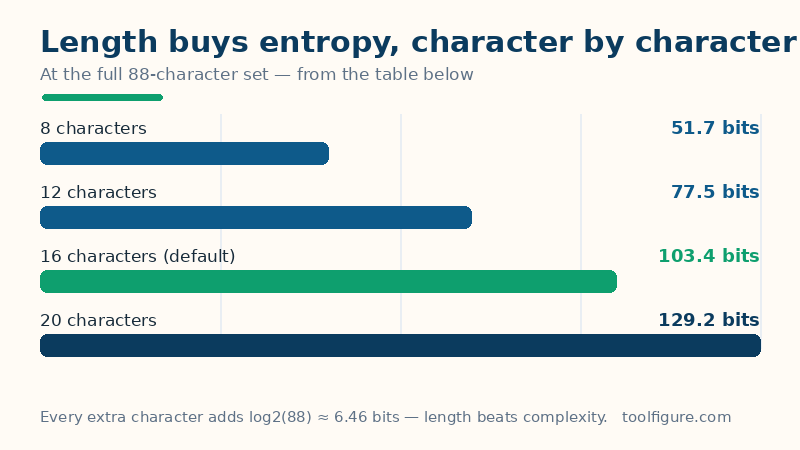
Read the formula in words: each position in the password is an independent draw from the set. With all four sets ticked the set has 26 + 26 + 10 + 26 = 88 characters, so each position carries log2(88) ≈ 6.46 bits, and doubling the length doubles the bits — while doubling the set size adds only one bit per character. That asymmetry is the most useful fact on this page: length beats complexity. A 20-character password drawn from lowercase letters alone (20 × log2(26) ≈ 94.0 bits... worked exactly below) outranks a short password stuffed with symbols, and is far easier to type. The guarantee of one character from each ticked set exists because many sites demand it — and, stated honestly, it trims the true entropy a little below the headline figure, since an attacker who knows the rule can skip passwords lacking a digit; at sensible lengths the difference is small and the headline remains the standard estimate every checker quotes.
Worked example: the default settings, taken apart
The defaults above — 16 characters, all four sets ticked — give a set size of 88 and therefore an entropy of 16 × log2(88) = 16 × 6.4594 = 103.4 bits, which this page labels Excellent. The number of possible passwords is 88^16 ≈ 1.29e+31 — about 13 thousand billion billion billion. Even a rig testing a trillion guesses a second would need, on average, hundreds of billions of years to reach yours. What you actually receive is random — this page cannot show you "the" default password, because there isn't one; two visits never produce the same string, and that is precisely the property being sold. What can be shown, and checked, is the arithmetic around whatever password appears: change the length to 12 and the table must read 77.5 bits (12 × 6.4594); untick everything except lowercase at length 12 and it must read 56.4 bits (12 × log2(26) = 12 × 4.7004), labelled Fair. If those numbers ever disagree with the table on this page, the page is wrong — the formula above is the authority.
What length buys you, at the full 88-character set
| Length | Entropy | Possible passwords | Label used here |
|---|---|---|---|
| 8 characters | 51.7 bits | 3.60e+15 | Fair |
| 12 characters | 77.5 bits | 2.16e+23 | Strong |
| 16 characters (default) | 103.4 bits | 1.29e+31 | Excellent |
| 20 characters | 129.2 bits | 7.76e+38 | Excellent |
| 12 characters, lowercase only (set of 26) | 56.4 bits | 9.54e+16 | Fair |
| 12 characters, lowercase + digits (set of 36) | 62.0 bits | 4.74e+18 | Strong |
The last two rows are the length-beats-complexity lesson in numbers: adding digits to a 12-character lowercase password buys 5.6 bits, while adding four characters at the full set buys 25.9. The labels are this page's scale — under 40 bits Weak, 40–59 Fair, 60–79 Strong, 80–99 Very strong, 100 and above Excellent — and they assume an attacker who must guess the password itself. Against a badly defended website that leaks its password database, even 60 bits falls quickly to offline cracking; against an ordinary online login form, which rate-limits guesses, far less is plenty. Context decides, and the honest summary is: use 16 or more here, use a different one on every site, and let a password manager remember them.
How the randomness works — and the limits
The generator draws from crypto.getRandomValues, the cryptographic random source built into every modern browser, and uses rejection sampling: random values that would bias the draw are discarded and redrawn, so each character in the set is exactly as likely as every other — no character is favoured by the arithmetic. The finished password is shuffled (again with the same random source) so the guaranteed characters do not sit in predictable positions. Three limits deserve stating plainly. Entropy is an estimate for generated passwords only — it describes this page's output, not a password you typed. This page cannot save you from reuse: one excellent password used on ten sites is one breach away from being ten breaches; generate a fresh one per account. And the clipboard is not a vault — copy the password straight into your password manager or the signup form, and treat any password you generated on a device you do not trust (a public or borrowed computer) as burned: generate a replacement on your own machine. No password, account detail or anything else you do here is sent to ToolFigure's servers — generation happens entirely on your device, and the page works offline once loaded.
Frequently asked questions
Is it safe to generate a password on a website?
On this page, yes — with a condition. The password is created by code running in your own browser, from your browser's cryptographic random source; it is never sent to a server, never stored, and the page works with the network disconnected. The condition is the device: only generate passwords you intend to keep on a computer and browser you trust, signed into your own profile.
How long should a password be?
For an account that matters, 16 characters from the full set — the defaults above — gives 103.4 bits of entropy, far beyond brute-force reach. Twelve characters (77.5 bits) is a reasonable floor for ordinary accounts. What length cannot fix is reuse: a different password per site matters more than any single password's length.
Why does the generator guarantee one character from each set?
Because many signup forms require at least one uppercase letter, digit or symbol, and a purely random short password can occasionally miss one by chance. The generator places one of each, fills the rest from the combined set, then shuffles so the guaranteed characters land in unpredictable positions. The trade-off is stated on the page: the guarantee trims the true entropy slightly below the headline figure.
What does 103.4 bits of entropy actually mean?
It means the password was drawn from about 2^103.4 — roughly 1.29e+31 — equally likely possibilities, so an attacker guessing passwords one by one expects to try about half of them before arriving at yours. At a trillion guesses per second that is hundreds of billions of years. Entropy turns 'strong' from an opinion into arithmetic: bits = length × log2(set size).
Should I exclude the look-alike characters (l, I, 1, O, 0)?
Only if you expect to read the password aloud or type it from a printout — the five look-alikes cause most transcription errors. The cost is real but small: excluding them shrinks the letter and digit sets (lowercase falls to 25, digits to 8), so the entropy shown drops accordingly. If the password goes straight into a password manager, leave them in and keep the bits.