Two directions, and only one of them is multiplication
Adding VAT is the easy direction: the tax is a percentage of the price before tax, so you multiply. Removing VAT — finding the price before tax inside a total that already includes it — is where invoices, expense claims and bookkeeping quietly go wrong, because the obvious move is wrong. Subtracting the rate from the gross price treats the tax as a percentage of the gross, but VAT was charged as a percentage of the net, and those two bases are different numbers. This calculator does both directions in whole cents, so the net, the VAT and the gross it shows always add up exactly — and it is a deliberately different job from the sales tax calculator, which handles the US register tax: VAT is charged at every stage of a supply chain, with businesses reclaiming the tax on their inputs, which is exactly why extracting it correctly from a gross figure matters.
The formulas, with every term defined
Adding: VAT amount = net × rate ÷ 100 · gross = net + VAT amountRemoving: net = gross ÷ (1 + rate ÷ 100) · VAT amount = gross − netThe VAT inside a gross amount is rate ÷ (100 + rate) of that amount — at 20%, exactly 1/6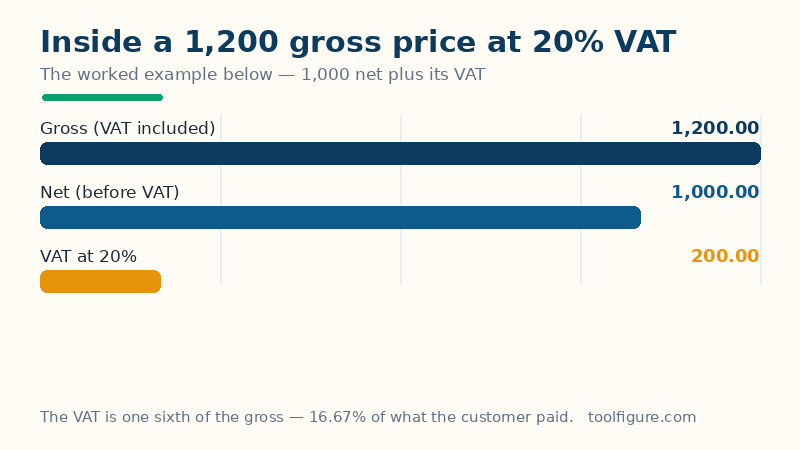
Net is the price before VAT, gross is the price with VAT included, the rate is the percentage charged, and the VAT amount is the difference between the two. Read the removing formula carefully: you divide by 1 plus the rate, you do not subtract the rate. At 20%, dividing a gross figure by 1.20 is the same as taking 100/120 of it as net and 20/120 — one sixth — as VAT. That fraction, rate over 100-plus-rate, is the share of any gross amount that is tax, and it is always smaller than the headline rate: VAT at 20% is 16.67% of the price the customer actually paid.
Worked example: 1,000 at 20%, both ways
The defaults above add VAT to a net amount of 1,000 at 20%. The VAT is 1,000 × 20 ÷ 100 = 200.00, and the gross is 1,000 + 200 = 1,200.00 — the three bars in the chart. Now run it backwards, the way an expense claim does: a receipt shows 1,200 gross at 20%. The net is 1,200 ÷ 1.20 = 1,000.00 and the VAT inside it is 1,200 × 20/120 = 200.00, one sixth of the receipt. The wrong method — subtracting 20% of 1,200 — would claim a net of 960 and VAT of 240, overstating the reclaimable tax by 40. That 40 is not a rounding issue; it is 20% charged on the wrong base, and it is the single most common VAT error this page exists to prevent.
More amounts and rates, verified both ways
| Calculation | VAT | Other figure |
|---|---|---|
| Worked example: add 20% to 1,000 net | 200.00 | 1,200.00 gross |
| Remove 20% from 1,200 gross | 200.00 | 1,000.00 net |
| Add 20% to 500 | 100.00 | 600.00 gross |
| Add 5% to 250 (a reduced rate) | 12.50 | 262.50 gross |
| Add 23% to 850 (Ireland's standard rate) | 195.50 | 1,045.50 gross |
| Remove 23% from 1,045.50 | 195.50 | 850.00 net |
| Add 15% to 1,000 (Saudi Arabia's standard rate) | 150.00 | 1,150.00 gross |
| Add 19% to 1,000 (Germany's standard rate) | 190.00 | 1,190.00 gross |
| Add 20% to 99.99 | 20.00 | 119.99 gross |
Every remove row is its add row read backwards, which is the check to apply to your own figures: if adding the rate to your extracted net does not rebuild the gross on the receipt, the extraction was wrong. The last row shows the rounding rule doing its work — 20% of 99.99 is 19.998, which the calculator rounds to 20.00 in whole cents, and 99.99 + 20.00 = 119.99 exactly. Working in cents throughout, rather than rounding only at the end, is what keeps the three displayed figures consistent on real-world amounts that are never round numbers.
How to read your result — and its limits
The three figures are the whole answer: quote the net in your accounts, the VAT amount in your return, the gross on the customer invoice. Three limits belong with the page. One rate per calculation: invoices that mix standard-rated, reduced-rated and zero-rated lines must be split and each part run separately — a single blended rate will not reproduce the invoice. The rate is yours to get right: standard rates differ by country and reduced rates by product, and they change; the figures in the table above are the standard rates in common use, not a ruling on your goods — for a selling price built from cost, the profit margin calculator is the companion tool, and for money crossing borders the currency converter handles the exchange step. And this is arithmetic, not tax advice: registration thresholds, place-of-supply rules and what may be reclaimed are matters for your accountant or tax authority. What this page guarantees is narrower and checkable: given an amount and a rate, the split between net, tax and gross is exact.
Frequently asked questions
How do I remove VAT from a price that already includes it?
Divide the gross amount by 1 plus the rate as a decimal: at 20%, divide by 1.20. A 1,200 gross amount becomes 1,200 ÷ 1.20 = 1,000 net, and the VAT inside it is the remaining 200. Equivalently, the VAT is the rate divided by 100 plus the rate, of the gross — at 20% that is 20/120, exactly one sixth of the receipt total.
Why is subtracting 20% from the gross price wrong?
Because VAT was calculated on the net price, not on the gross. Twenty percent of the 1,200 gross is 240, but the tax actually charged was 20% of the 1,000 net, which is 200. Subtracting the percentage of the larger number overstates the VAT by 40 and understates the net by the same amount — the classic error when reclaiming VAT from receipts.
What is the difference between VAT and sales tax?
Sales tax, as used in the US, is charged once, at the final sale to the consumer. VAT is charged at every stage of production and distribution, with each business paying VAT on its sales and reclaiming the VAT on its purchases, so the tax collected at each stage is only on the value that stage added. The arithmetic on a single price looks similar; the removing direction and the reclaim are where VAT needs its own calculator.
Which VAT rate should I use?
The standard rate of the country where the supply is taxed: 20% in the UK and France, 19% in Germany, 23% in Ireland, 27% in Hungary, 15% in Saudi Arabia and 5% in the UAE are the standard rates in common use. Many goods — food, children's clothing, energy, books depending on the country — carry reduced or zero rates, so the rate printed on your invoice or your tax authority's list is the one to enter.
How does the calculator round VAT?
In whole cents, the way invoices are written. The VAT amount is rounded to the nearest cent first and the gross is then the net plus that rounded VAT, so the three figures shown always add up exactly — 99.99 at 20% gives VAT of 20.00 (19.998 rounded) and a gross of 119.99, never a total that is a cent adrift from its own parts.