The Magnus formula
The dew point is the temperature to which air must cool, at constant pressure, before water vapour starts to condense — the point where the air is saturated. The standard way to compute it from temperature and humidity is the Magnus formula, which first combines them into an intermediate value α and then inverts it:
α = ln(RH ÷ 100) + (a × T) ÷ (b + T) — Dew point = (b × α) ÷ (a − α)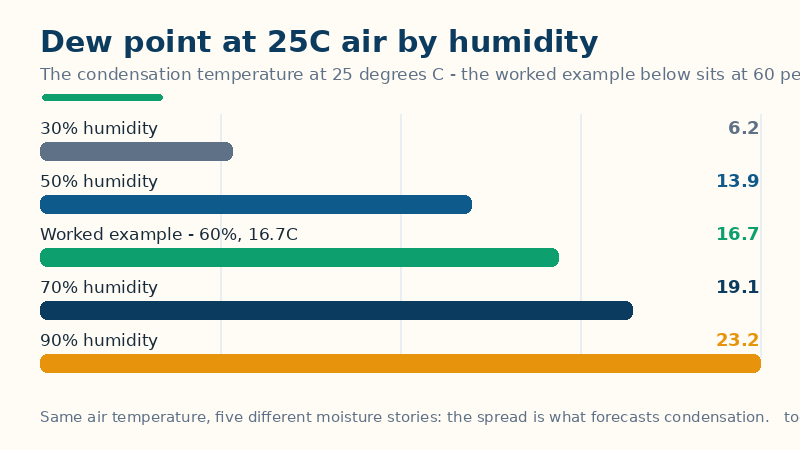
Here T is the air temperature in degrees Celsius, RH is the relative humidity as a percentage, and a and b are empirical constants: this page uses a = 17.625 and b = 243.04°C, the widely used Alduchov–Eskridge set fitted for −40°C to 50°C. Other published sets exist — the classic 17.27 and 237.7°C pair is the other common one — but they are fits to the same physics, and at the worked example below they differ by only about 0.02°C, so the choice of set is not something a user needs to worry about. Fahrenheit inputs are converted to Celsius before the formula runs, and the answer is converted back. The formula is accurate to roughly ±0.4°C across typical surface conditions; outside that range — sub-freezing air, very low humidity, high altitude — treat the result as an approximation.
Worked example: 25°C at 60% humidity
First the intermediate value: α = ln(0.60) + (17.625 × 25) ÷ (243.04 + 25) = −0.5108 + 1.6437 = 1.1331. Then the dew point: (243.04 × 1.1331) ÷ (17.625 − 1.1331) = 275.38 ÷ 16.4919 = 16.70°C, shown as 16.7°C (62.1°F). The spread — air temperature minus dew point — is 25.0 − 16.7 = 8.3°C: the air must cool by 8.3 degrees before moisture condenses. The comfort band for 16.7°C is noticeably humid. The same 25°C at other humidities shows why the dew point beats relative humidity as a comfort guide: 30% gives 6.2°C (dry and comfortable), 50% gives 13.9°C (pleasant), the worked 60% gives 16.7°C, 70% gives 19.1°C (humid and uncomfortable) and 90% gives 23.2°C (very humid and oppressive). And the cross-check in Fahrenheit: 77°F — the same 25°C — at 60% humidity returns the same 62.1°F dew point, as it must, since the conversion runs through the same Celsius arithmetic. At 100% humidity the formula returns exactly the air temperature, 25.0°C: the air is already saturated, and that is a useful sanity check on any dew point calculator — a dew point above the air temperature is impossible, and a calculator that prints one is broken.
How to read your result, and its limits
Three readings come out of one number. First, the spread is the condensation forecast: a small spread means dew, fog or a dripping tent fly is near — the air needs only a small overnight fall to saturate — while a large spread means surfaces stay dry unless something cools them far below the air, like a cold water pipe or an uninsulated wall. Second, the dew point is the comfort number meteorologists trust over relative humidity, because it measures the actual moisture in the air: 60% humidity feels dry at 10°C and oppressive at 30°C, but a 16°C dew point feels the same either way. Third, any surface at or below the dew point gets wet: that is the practical rule for window condensation, mould risk on cold walls, and dew on camping gear — warm the surface or dry the air, since the dew point itself is set by the weather. Below freezing, the same number is strictly the frost point: moisture deposits as ice rather than liquid, and the frost forms on any surface at or below it. The limits are the formula's own: it assumes standard surface pressure, so at high altitude or in very dry, very cold air the ±0.4°C accuracy widens, and it describes the air, not a microclimate — the humidity inside a tent or a bathroom can differ sharply from the room reading.
Common mistakes
- Judging comfort by relative humidity alone. Relative humidity is a ratio to saturation at the current temperature, so it changes with temperature even when the moisture does not. Two days at 60% humidity can feel entirely different; two days at the same dew point feel the same.
- Expecting a dew point above the air temperature. The dew point can never exceed the air temperature — at 100% humidity it equals it. If a calculator prints a higher dew point, its arithmetic is wrong, not the weather unusual.
- Blaming the window for condensation. Condensation appears because a surface fell to the dew point, not because the window failed: the fixes are warming the surface, ventilating the moisture away, or dehumidifying — in that order of cheapness.
- Mixing readings from different places. A temperature from the shade and a humidity from indoors, or readings taken an hour apart, feed the formula a combination that never existed. Measure both at the same place and time.
Related tools: Heat Index Calculator — How hot it really feels — the official NWS heat index from temperature and humidity, with the danger band; Temperature Converter — Convert °C, °F, K, °R and °Ré — every answer in all five scales, formulas shown; Wind Chill Calculator — How cold it really feels — the official wind chill from temperature and wind speed, with the frostbite-risk band.
Frequently asked questions
What is the dew point in simple terms?
The temperature the air must cool to before water vapour condenses into dew, fog or droplets. It is the temperature at which the air becomes saturated with moisture — any further cooling squeezes water out of the air.
Why is the dew point better than relative humidity for comfort?
Because relative humidity is a percentage of saturation at the current temperature, so it changes as the temperature changes even when the moisture stays the same. The dew point measures the actual moisture content, so the same dew point feels the same on a cool day and a warm one.
Can the dew point be higher than the air temperature?
No — never. At 100% relative humidity the dew point equals the air temperature, and it cannot go above it. A calculator that reports a dew point above the air temperature has a bug.
What does a small spread between temperature and dew point mean?
That condensation is near: the air only has to cool a little before it saturates, so dew, fog or dripping surfaces are likely overnight. A large spread means the air is far from saturation and surfaces stay dry.