Three steps: average watts, hours a day, standby hours
The whole calculation is one multiplication repeated twice, and the average watts are the one people get wrong. Average watts divided by 1,000 is kilowatts; kilowatts times the hours used is the use energy; standby watts divided by 1,000 times the standby hours is the standby energy; the two energies added together times the price is the day's money; the day times 365 is the year's energy and money. The month is the year divided by 12, not the day times 30 — the two differ by about three cents on a laptop, and the year-divided-by-12 figure is the one this page uses, so it agrees with the yearly total exactly:
energy per day (kWh) = average watts ÷ 1,000 × hours used + standby watts ÷ 1,000 × standby hours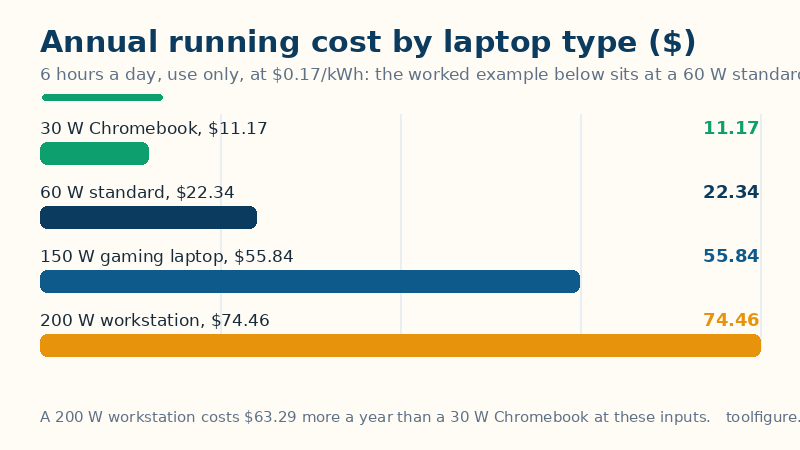
annual cost ($) = energy per day × 365 × electricity priceThe charger rating is the maximum, not what the laptop uses day to day: a 65 W or 90 W charger only tells you the most the laptop is allowed to pull, and the machine rarely sits at that limit — the charger must cover the peak draw plus battery charging, so it always sits above the average. What matters is the average wall draw: a plug-in power meter on the charger for a week gives the real figure, and 60 W is the usual starting estimate for a standard laptop, 30 W for a Chromebook and about 150 W for a gaming laptop.
Worked example: 60 W average, 6 hours a day, 2 W standby for 18 hours, $0.17/kWh
A 60 W laptop used for 6 hours a day uses 0.06 × 6 = 0.360 kWh in use, costing $0.06, and 0.002 × 18 = 0.036 kWh on standby, costing $0.01. A day is 0.360 + 0.036 = 0.396 kWh, costing $0.07. A month is 144.54 ÷ 12 = 12.0 kWh, costing $2.05. A year is 0.396 × 365 = 144.5 kWh, costing $24.57. The table above shows the same maths for the other laptop types at 6 hours a day and $0.17/kWh, use only: a 30 W Chromebook uses 0.180 kWh a day, costing $0.03 a day, $0.93 a month and $11.17 a year, a 45 W ultrabook uses 0.270 kWh a day, costing $0.05 a day, $1.40 a month and $16.75 a year, the worked example's 60 W standard laptop uses 0.360 kWh a day, costing $0.06 a day, $1.86 a month and $22.34 a year, a 150 W gaming laptop uses 0.900 kWh a day, costing $0.15 a day, $4.65 a month and $55.84 a year, and a 200 W workstation uses 1.200 kWh a day, costing $0.20 a day, $6.21 a month and $74.46 a year. One hour of use costs 1.0¢; use alone costs $22.34 a year and standby alone $2.23; ten years at this pace costs $245.72. Six published cross-checks reproduce exactly: wattcostcalc's 60 W laptop at 6 hours a day and $0.175 costs $0.011 an hour, $0.063 a day, $1.89 a month and $23.00 a year — this page gives the same $0.011 an hour, $0.063 a day and $23.00 a year, with $1.92 a month on the year-divided-by-12 figure against their $1.89 on a 30-day month. costtorun's laptop charger at 65 W, 4 hours a day and $0.15 costs $0.01 an hour, $0.04 a day, $1.17 a month and $14.24 a year — this page gives the same $0.01 an hour, $0.04 a day and $14.24 a year, with $1.19 a month on the year-divided-by-12 figure against their $1.17 on a 30-day month. slashplan's 50 W laptop at 4 hours a day and $0.14 costs 0.20 kWh a day, $0.03, 6.00 kWh a month, $0.84, and 73.00 kWh a year, $10.22 — this page gives the same 0.20 kWh a day, $0.03 and $10.22 a year, with 6.1 kWh a month ($0.85) on the year-divided-by-12 figure against their 6.00 kWh on a 30-day month. joteo's gaming laptop at 142 W, 3.5 hours a day and 18.7¢ costs 0.497 kWh a day, $0.09, 14.9 kWh a month and 181.4 kWh a year, about $34 — this page gives the same 0.497 kWh a day, $0.09 and $33.92 a year, with 15.1 kWh a month on the year-divided-by-12 figure against their 14.9 kWh on a 30-day month. And electricitycostcalc's 50 W laptop at 6 hours a day uses 110 kWh a year, £29 at 26.11p and $19 at 17¢ — this page gives the same 109.5 kWh a year, £28.59 and $18.62. And measureandbuild's 50 W laptop at 8 hours a day and $0.33 costs $48 a year — this page gives $48.18.
How to read your result, and its limits
Four cautions keep the number honest. First, the charger rating is not the draw: at the worked example's inputs a 60 W average costs $22.34 a year use only, but a laptop with a 90 W charger does not draw 90 W while working — priced as if it did, the same hours would cost $33.51 a year, half as much again. Enter the average draw, and measure it with a plug-in power meter if you want the number exact. Second, standby is small but real: at the worked example's inputs 2 W for 18 hours a day costs $2.23 a year, about a tenth of the bill — unplugging saves about two dollars a year, so battery care, not the bill, is the reason to unplug once the battery is full. Third, the month is not thirty days: the day times 30 gives $2.02 a month at the worked example's inputs, while the year divided by 12 gives $2.05 — use the year-divided-by-12 figure, which is the one that adds up. Fourth, this page prices electricity only: the laptop itself, the charger and the battery are separate lines, and the electricity price is the all-in rate, the total on the bill divided by the kilowatt-hours on the bill. For the cost of running the desktop next to the laptop, the gaming PC cost calculator prices it by gaming and idle watts; for the cost of running anything else, the electricity cost calculator prices any appliance by watts and hours.
Common mistakes
- Entering the charger rating as the average watts. A laptop with a 90 W charger does not draw 90 W while working — a standard laptop averages about 60 W, a Chromebook about 30 W. Enter the average draw, not the charger's label.
- Pricing the hours of use and forgetting the standby hours. Use is $22.34 a year at the worked example's inputs, but the standby hours add $2.23 — a tenth of the bill. Count both, or set the standby watts to 0 if the laptop is unplugged when not in use.
- Multiplying the daily cost by 30 for the month. Thirty days is not a twelfth of a year: the day times 30 gives $2.02 a month at the worked example's inputs, while the year divided by 12 gives $2.05. Use the year-divided-by-12 figure, which is the one that adds up.
- Counting the standby hours and the use hours as the same hours. The two are separate stretches of the day: 6 hours of use plus 18 hours of standby is a full 24-hour day plugged in. If the laptop is used 8 hours and left plugged in overnight, the standby hours are 16, not 24.
- Adding the standing charge to every hour of use. The daily supply charge is payable whether the laptop runs or not. Only the per-kWh rate belongs in the per-hour maths — the fixed charge is a separate line on the bill.
Related tools: TV Cost Calculator — What does your TV really cost to run? Price the watching and the standby — per hour, day, month and year.
Frequently asked questions
How much does it cost to run a laptop?
At the worked example's inputs — a 60 W average, 6 hours a day, 2 W standby for 18 hours — a laptop costs $0.07 a day, $2.05 a month and $24.57 a year at $0.17 per kWh. Use only, a 30 W Chromebook costs $11.17 a year, a 60 W standard laptop $22.34 and a 150 W gaming laptop $55.84 a year at the same hours and rate.
How many watts does a laptop use?
A Chromebook averages about 30 W, an ultrabook about 45 W, a standard laptop about 60 W, a gaming laptop about 150 W and a mobile workstation about 200 W while in use. The charger rating — 65 W or 90 W on most standard laptops — is a maximum, not a draw, and sits above the average.
Does leaving a laptop charger plugged in cost much?
No. At the worked example's inputs — 2 W for 18 hours a day — standby costs $2.23 a year, about a tenth of the laptop's $24.57. Unplugging once the battery is full saves about two dollars a year; battery care is the main reason to do it.
How can I reduce my laptop's electricity cost?
The bill is small to begin with — $24.57 a year at the worked example's inputs — so the levers are small too: dim the screen, let the laptop sleep instead of idling at full brightness, and unplug once the battery is full. The watts dominate the bill, so the biggest saving is a lower average draw, not fewer hours: a 30 W Chromebook costs $11.17 a year against $22.34 for a 60 W standard laptop at the same hours.