The one number with two answers
A gigabyte is not always a gigabyte. Drive makers count in decimal — 1 GB is 1,000,000,000 bytes, the SI way — while operating systems and memory count in binary — 1 GiB is 1,073,741,824 bytes, the 2³⁰ way. Both camps still write "GB" on the box, which is why a new 1 TB drive reports about 931 GiB the moment you plug it in: no storage is missing, the two sides are simply counting with different rulers. This converter keeps both systems honest by carrying all ten units — bits, bytes, the decimal KB/MB/GB/TB and the binary KiB/MiB/GiB/TiB — converting through exact bytes, and answering in every unit at once, with a two-systems row spelling out the drive-capacity figure both ways.
The factors, with every variable defined
Step 1 — into bytes: bytes = value × the from-unit's bytesStep 2 — out to the target: result = bytes ÷ the to-unit's bytesBytes per unit: bit 1/8 · byte 1 · KB 1,000 · MB 1,000,000 · GB 1,000,000,000 · TB 1,000,000,000,000 · KiB 1,024 · MiB 1,048,576 · GiB 1,073,741,824 · TiB 1,099,511,627,776The bit rule: 1 byte = 8 bits, by definition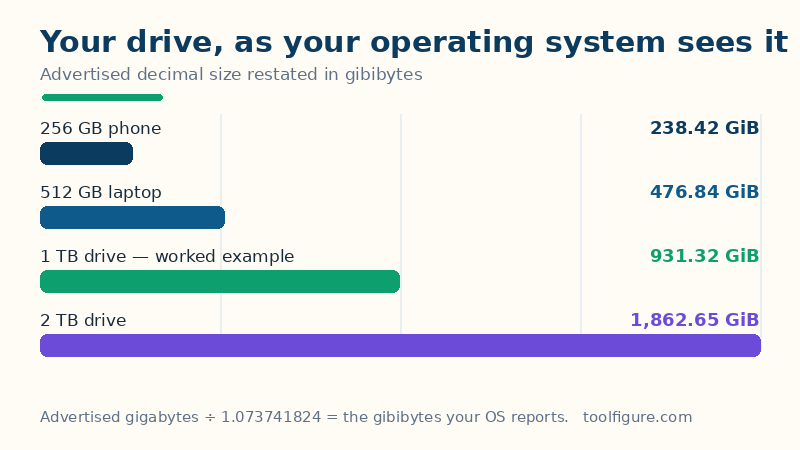
The decimal units are powers of ten — each is exactly 1,000 times the one below, the way the International System of Units defines them. The binary units are powers of two — each is exactly 1,024 times the one below, the IEC's kibi/mebi/gibi/tebi naming, where "KiB" is the unambiguous way to write what many apps still label "KB". The bit is the odd one out: it is not a fraction of a byte by measurement but by definition, eight bits to the byte, which is why network speeds in megabits need dividing by eight before they mean anything about a file.
Worked example, done step by step
Convert 1 TB to GiB — the new-drive question. Step 1: into bytes. 1 × 1,000,000,000,000 = 1,000,000,000,000 bytes — that is the trillion bytes the maker sold you. Step 2: out to gibibytes. 1,000,000,000,000 ÷ 1,073,741,824 = 931.32 GiB. The same trillion bytes is 1,000 GB in decimal and 953,674.32 MiB in binary — all three sit in the every-unit table the moment you type. Nothing vanished; the operating system is counting the same bytes in bigger handfuls.
The phone example — 256 GB. 256 × 1,000,000,000 = 256,000,000,000 bytes; ÷ 1,073,741,824 = 238.42 GiB of real room, or 244,140.63 MiB. When a phone's storage screen shows less than the box promised, this is almost always the whole explanation — the rest is the operating system and preinstalled apps, not a second round of the same trick.
Drive sizes: advertised against reported
| What the box says | Bytes, exactly | What your OS shows |
|---|---|---|
| 128 GB | 128,000,000,000 | 119.21 GiB |
| 256 GB | 256,000,000,000 | 238.42 GiB |
| 512 GB | 512,000,000,000 | 476.84 GiB |
| 1 TB (worked example) | 1,000,000,000,000 | 931.32 GiB |
| 2 TB | 2,000,000,000,000 | 1,862.65 GiB |
| 4 TB | 4,000,000,000,000 | 3,725.29 GiB |
The gap is a fixed ratio — every decimal gigabyte is 0.9313226 GiB — so the shortfall grows with the drive: about 7% whatever the size. RAM is the exception that proves the rule: memory has always been sold and counted in binary, so a 16 GiB stick really is 16 × 1,073,741,824 bytes.
Where you will actually meet each system
Decimal (KB, MB, GB, TB) is the language of the shop: hard drives, SSDs, USB sticks and phone storage are labelled this way, and internet and mobile data allowances are usually billed in decimal gigabytes too. Binary (KiB, MiB, GiB, TiB) is the language of the machine: Windows File Explorer, macOS storage screens, Linux tools and RAM specifications count this way. Bits are the language of the wire: broadband and mobile speeds are quoted in megabits per second, and only dividing by eight turns a speed into a download time.
Reading the result, and its limits
Three honest notes. First, the unit gap is not the whole story on a real drive: the filesystem itself reserves space for its bookkeeping, and a preinstalled operating system occupies room too, so a 1 TB drive shows a little less than 931.32 GiB of free space even after the maths above. Second, bits and bytes answer different questions: a 500 MB file is 4,000 megabits, so on a 100 Mbps connection it needs 40 seconds in the perfect case — 4,000 ÷ 100 — and longer in the real one. Third, rounding: this page displays two decimals, which is plenty for buying decisions; the byte counts underneath are exact. For the binary arithmetic underneath subnets and IP addresses, the subnet calculator works the same powers of two in the open.
Frequently asked questions
How many MB are in 1 GB?
It depends on who is counting — and both answers are honest. In the decimal SI system that drive makers use, 1 GB = 1,000 MB exactly. In the binary system that operating systems use, 1 GiB = 1,024 MiB exactly. The confusion comes from both being written 'GB'. This converter carries both systems side by side so you can see which one any figure is using.
Why does my 1 TB hard drive show as 931 GB?
Nothing is missing — the drive holds the full trillion bytes it promised. The maker counts in decimal (1 TB = 1,000,000,000,000 bytes) while your operating system counts in binary gibibytes (1 GiB = 1,073,741,824 bytes). A trillion bytes divided by 1,073,741,824 is 931.32 GiB. The 'missing' gigabytes are the same bytes counted in bigger handfuls, about a 7% difference that applies to every drive size.
How many bits are in a byte?
Eight, by definition — 1 byte = 8 bits. This matters because network speeds are quoted in bits (a 100 Mbps connection) while file sizes are quoted in bytes (a 500 MB video). To estimate a download time, multiply the megabytes by 8 to get megabits, then divide by the speed: 500 × 8 = 4,000 megabits, and 4,000 ÷ 100 = 40 seconds in the ideal case.
What is the difference between MB and MiB?
MB is the decimal megabyte: exactly 1,000,000 bytes (10⁶). MiB is the binary mebibyte: exactly 1,048,576 bytes (2²⁰) — about 4.9% larger. The IEC introduced the kibi/mebi/gibi/tebi names so the two systems could never be confused, but many apps still write 'MB' when they mean 'MiB'. RAM and operating-system displays use the binary sizes; drive labels and data plans use the decimal ones.